

Server Guides How to identify UI texture coordinates (Texture Atlas / UV Mapping)?

Gatzu09

Pirate
Registered
LV
0
 
Joined
Apr 10, 2026
Messages
13
Reaction score
1
Points
8
Hello everyone,
I have a question regarding the UI system and texture mapping.
I'm currently creating and editing my own game interfaces (inventory, chat, windows, etc.). While analyzing the source code, I noticed that a single texture file contains multiple UI elements, and each element is rendered using a specific set of coordinates that define which part of the texture should be displayed.
My question is:
How do experienced developers work with these texture coordinates (UV coordinates or texture atlas regions) efficiently?
Is there a recommended workflow or tool to identify exactly which section of the texture corresponds to each UI element, instead of modifying the coordinates by trial and error?
I would like to learn how to edit these regions more accurately and understand how the coordinate system works internally.
Any documentation, tutorials, or advice would be greatly appreciated.
Thank you!
_________________________________________________________________________________________________________________________________________________________________________________________________
Hola a todos.
Tengo una duda sobre el sistema de interfaces y el mapeo de texturas.
Actualmente estoy creando y editando mis propias interfaces del juego (inventario, chat, ventanas, etc.). Al analizar el código fuente, noté que un solo archivo de textura contiene varios elementos de la interfaz, y que cada uno utiliza un conjunto de coordenadas que indican qué parte de esa textura debe mostrarse.
Mi pregunta es la siguiente:
¿Cómo trabajan los desarrolladores experimentados con estas coordenadas de textura (coordenadas UV o regiones de un atlas de texturas) de forma eficiente?
¿Existe algún flujo de trabajo, herramienta o método recomendado para identificar exactamente qué sección de la textura corresponde a cada elemento de la interfaz, sin tener que modificar las coordenadas por prueba y error?
Me gustaría aprender a editar estas regiones con mayor precisión y comprender cómo funciona internamente este sistema de coordenadas.
Cualquier documentación, tutorial o consejo será muy bien recibido.
¡Muchas gracias!
 
The UI is a headache for the developer; it might be easier to rebuild it using RmlUI than to deal with the legacy system.
However, in RmlUI, you also need to set the coordinates of the image from the texture atlas, and you will need to change the coordinates of all buttons, windows, and forms when you modify the interface.
 
  • Like
Reactions: Gatzu09
все в
However, in RmlUI, you also need to set the coordinates of the image from the texture atlas, and you will need to change the coordinates of all buttons, windows, and forms when you modify the interface.
that's true, but it's much more convenient to set it in CSS styles.
 
  • Like
Reactions: Gatzu09
However, in RmlUI, you also need to set the coordinates of the image from the texture atlas, and you will need to change the coordinates of all buttons, windows, and forms when you modify the interface.
that kinda correct even worst you have to learn css, html if you're not Familiar with it , i have the both codex in two of my clients i will do compare between the two soon,
migration to RmlUI means you have to rework engine codes, forms, and that's alot of works for most of people even for ai , >with ai helps this takes a week <
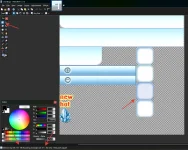
for legacy forms, codes you can simply do small c++ code to refresh ui elements in run time with x shortcut and use photoshop to get x cords, placing images, buttons in forms for legacy code annoying without live edits but its so simply once u do small hooks for mouse event to get x cord where u click on x forms
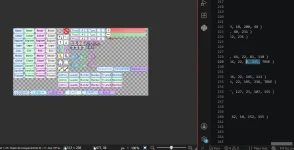
legacy photos you load like this x,y, size just find any image in .clu and follow the example
1784129672995.webp
 
You can use Aesprites to find the exact pixel location.
Thank you for the suggestion, Larry.

I actually tried the free version of Aseprite before, but I didn't pay much attention to it at the time. Now that you mention it, I think it could be a great tool for finding the exact coordinates of a pixel thanks to its simple and user-friendly interface.

I also think it could be useful for creating small 2D animations or story scenes to make the game feel more alive and give it a fresh touch.

I'll keep experimenting with it to see how much it can help with my project. Thanks again for the recommendation! God bless.
 
You can use any photo editor, and highlight object and it can show you X,Y locations.
 
  • BlueSquidRollingEyes
Reactions: Gatzu09
The UI is a headache for the developer; it might be easier to rebuild it using RmlUI than to deal with the legacy system.
To be honest, I'm not familiar with RmlUI. Is it a piece of software, a UI framework, or something else?

Some of the previous comments were about tools for finding pixel coordinates, but this sounds like a completely different approach. Could you tell me where I can find it or how to get started with it?

I'm always open to learning new tools and techniques, so I'd be interested in exploring whether it could be used to modernize or work with the game's interface.

Thanks again for your comment. I really appreciate your guidance.
 
However, in RmlUI, you also need to set the coordinates of the image from the texture atlas, and you will need to change the coordinates of all buttons, windows, and forms when you modify the interface.
Thank you for the explanation, I really appreciate it.

I'm definitely going to look into RmlUI since you've mentioned it a few times. It sounds like it's an important tool for working with the game's UI, even if it also means a lot of extra work.

I don't know much about it yet, but I'm always willing to learn new things. If you could point me to where I can find RmlUI or any good tutorials or documentation, I'd really appreciate it.

Thanks again for taking the time to explain it to me!
 
todo en

Es cierto, pero es mucho más conveniente configurarlo en estilos CSS.
Gracias, Alexxst. Aprecio mucho tu consejo.

Me gusta la idea de usar estilos CSS para configurar la interfaz de usuario en lugar de depender del sistema antiguo. Por lo que dices, parece que así es mucho más fácil gestionar y modificar todo.

Sé que hay un periodo de adaptación, pero eso es normal con cualquier tecnología nueva. Una vez que se entienden los conceptos básicos, resulta mucho más fácil trabajar con ella.

Gracias de nuevo por tu recomendación. Sin duda la tendré en cuenta e intentaré ponerla en práctica.
 
Eso es bastante correcto, incluso peor, tienes que aprender CSS y HTML si no estás familiarizado con ellos. Tengo ambos códices en dos de mis clientes, haré una comparación entre los dos pronto.
La migración a RmlUI implica tener que reelaborar los códigos del motor, los formularios, y eso supone mucho trabajo para la mayoría de la gente, incluso para la IA. >Con la ayuda de la IA, esto lleva una semana.<
Para formularios heredados, puedes simplemente usar un pequeño código C++ para actualizar elementos de la interfaz de usuario en tiempo de ejecución con el atajo de teclado x y usar Photoshop para obtener las coordenadas x, colocar imágenes y botones en formularios para código heredado. Es molesto sin ediciones en vivo, pero es muy sencillo una vez que creas pequeños ganchos para el evento del mouse para obtener la coordenada x donde haces clic en los formularios x.
Las fotos antiguas se cargan de esta manera x,y, tamaño. Simplemente busque cualquier imagen en .clu y siga el ejemplo.
View attachment 792
Gracias por la explicación detallada, Montana.

Sinceramente, aprender CSS y HTML no me preocupa demasiado. No soy un experto, pero conozco lo básico y siempre estoy dispuesto a aprender si eso facilita el desarrollo a largo plazo.

Por lo que entiendo, el mayor desafío no es aprender RmlUI en sí, sino la cantidad de trabajo que implica migrar el sistema anterior: adaptar el motor, reconstruir los formularios y modificar gran parte del código existente. Ahí es donde reside el verdadero esfuerzo.

También me pareció muy interesante tu idea de crear una pequeña herramienta en C++ para actualizar elementos de la interfaz de usuario en tiempo de ejecución y obtener coordenadas mientras se trabaja en Photoshop. Creo que esto facilitaría mucho la edición de la interfaz, evitando tener que recompilar o realizar pruebas constantemente.

Voy a investigar más sobre RmlUI y también sobre este enfoque para trabajar con el sistema de interfaz de usuario anterior. Me gustaría comprender ambas opciones antes de decidir cuál se adapta mejor a mi proyecto.

Espero con interés la comparación que mencionaste entre los dos clientes. Estoy seguro de que me ayudará a comprender mejor las ventajas y desventajas de cada enfoque.

Gracias de nuevo por tomarte el tiempo para explicarlo todo, y gracias también por compartir la imagen de referencia. Me ayuda mucho a comprender cómo funciona el proceso.
 
1784161459306.webp
Wow... I finally get what you mean. 😄

I didn't realize it could be that simple. Seeing the example made everything click. I can just open the image in Paint.NET (or even Paint), select the area I need, read the X and Y coordinates, and then use those values in the UI code.

I was honestly overthinking it, but your explanation made it much clearer. Thanks a lot for taking the time to explain it—I really appreciate it!
 
Puedes usar cualquier editor de fotos, resaltar el objeto y te mostrará las ubicaciones X,Y.
Jaja, sí, ¡por fin lo entendí! Otro pirata compartió una imagen que me hizo comprenderlo todo.

Muchísimas gracias por tomarte el tiempo de responder y explicarlo. Aprecio mucho tu ayuda. ¡Gracias!
 
I understand everything you've explained about coordinates, HTML, CSS, and C++. It all makes sense to me now.

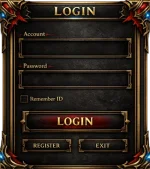
The only thing I'm still trying to understand is how to apply all of that when I want to use a completely new login interface. For example, I'd like to share one of my login screens as an example.

That's the part I'm still a little confused about. I understand how to find the X and Y coordinates, but I'm not sure how to adapt a brand-new UI to the existing system.

I'd love to hear your thoughts or suggestions on the best way to approach that.
1784162216474.webp
I think I understand how to find the X and Y coordinates now.

My next question is about connecting everything together. For example, if I create a completely new login screen, how do I link the Login button to my new UI?

I understand how to position the images and buttons, but I'm not sure how to associate the Login button with the new layout so that it still performs the login action when clicked.

Could you explain how that part works in the legacy UI system?
For this example, I'll use the existing legacy login UI just as a reference. I'm only using it as an example to better explain what I mean.

For example, this image is called imgAccout.

This is where the image is loaded, and these are the coordinates where it is displayed on the screen.

imgAccout = UI_CreateCompent( frmAccount, IMAGE_TYPE, "imgAccout", 320, 360, 0, 0 )<br>UI_LoadImage( imgAccout, "texture/ui/newloginnewui.png", NORMAL, 320, 360, 0, 0 )<br>
In this example, I understand where the image is loaded and where it is displayed. My question is: how do I connect the Login button to this new interface? How does the button know which UI element or form it belongs to?
1784162647720.webp


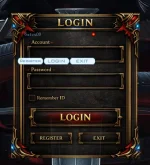
Based on what you've explained about coordinates, I assume the last two values (0, 0) correspond to the position inside the PNG texture, while the other values determine how and where the image is displayed.

The part I'm still confused about is this: how do I get the correct coordinates for placing a button exactly where I want it? Do you usually find them by adjusting the values little by little, or is there a tool or workflow that lets you get the correct coordinates right away?

That's the part I'm still trying to understand.
 
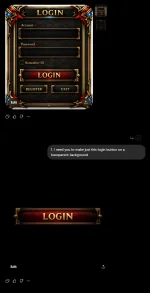
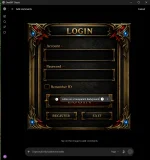
You need to make individual buttons not just overlaying the old ones. Start with just the background and input boxes then another for button active, button pressed, and you'll need a check mark image as well >.>

If you are using chatgpt to make your assets (assuming here), but you can click on the image and comment on it, ask it to generate just that button with a transparent background. You'll need to take it and remove the sad attempt at a transparent background it makes with something like photoshop or gimp, then you have clean assets and interactive buttons. Just have to map them correctly from there.

You can keep going back to the first image and isolating the parts you want.
 

Attachments

  • Screenshot 2026-07-15 220123.webp
    Screenshot 2026-07-15 220123.webp
    41.7 KB · Views: 1
  • Screenshot 2026-07-15 220019.webp
    Screenshot 2026-07-15 220019.webp
    81 KB · Views: 1
Last edited: