How to make Big Maps

iParanoia

Pirate
Registered
LV
0
 
Joined
Apr 4, 2026
Messages
15
Reaction score
2
Points
8
Hello Community,

like the Title says: How can i make Big Maps?
I created several new maps and would be good to have big maps.
Any Ideas here?
 
Hi,
You don't need to create a big map as such; the game renders it from the .pk file.


in Player.cpp (Server src)
C++:
CPlayer::CPlayer():
m_sGarnerWiner(0)
{T_B
    Init(NULL, 0);
    m_chGMLev = 0;
    m_dwValidFlag = PLAYER_INVALID_FLAG;

    m_CMapMask.AddMap("garner", defMAP_GARNER_WIDTH, defMAP_GARNER_HEIGHT);
    m_CMapMask.AddMap("magicsea", defMAP_MAGICSEA_WIDTH, defMAP_MAGICSEA_HEIGHT);
    m_CMapMask.AddMap("darkblue", defMAP_DARKBLUE_WIDTH, defMAP_DARKBLUE_HEIGHT);

    // Add by lark.li 20080812 begin
    m_CMapMask.AddMap("7xmas02", 296, 296);
    m_CMapMask.AddMap("darkswamp", 544, 1496);
    m_CMapMask.AddMap("abandonecity", 384, 384);
    m_CMapMask.AddMap("abandonecity2", 496, 496);
    m_CMapMask.AddMap("abandonecity3", 496, 496);
    m_CMapMask.AddMap("puzzleworld", 544, 544);
    m_CMapMask.AddMap("puzzleworld2", 544, 544);
    m_CMapMask.AddMap("garner2", 280, 280);
    m_CMapMask.AddMap("heilong", 1024, 1024);
    m_CMapMask.AddMap("ctf", 360, 424);
    m_CMapMask.AddMap("jialebi", 1840, 1440);
    m_CMapMask.AddMap("DreamIsland", 896, 896);
    m_CMapMask.AddMap("winterland", defMAP_DARKBLUE_WIDTH, defMAP_DARKBLUE_HEIGHT);
    m_CMapMask.AddMap("eastgoaf", defMAP_EASTGOAF_WIDTH, defMAP_EASTGOAF_HEIGHT);
    m_CMapMask.AddMap("lonetower", defMAP_LONETOWER_WIDTH, defMAP_LONETOWER_HEIGHT);
    m_lLightSize = g_lDeftMMaskLight;

    //��ʼ��Ħ���ʹ�������
    m_lMoBean = 0;
    m_lRplMoney = 0;
    m_lVipID = 0;
    m_strLifeSkillinfo = "";
    // Modify by lark.li 20080317
    memset(this->m_szPassword, 0 , sizeof(this->m_szPassword));
    //End
T_E}



in Client UIMinimapForm.cpp if you want to add info on Bigmap whit mouse is over
C++:
void CMiniMapMgr::_RenderBigMapHint(void)


Here's the Phyton script I made to read the height and width of the map, in case you didn't know.
Python:
import struct
import os
# ximboliex@pkodev.com
def read_atr_size(path):
    with open(path, "rb") as f:
        data = f.read(8)  # primeros 8 bytes
        if len(data) < 8:
            return (0, 0)
        width, height = struct.unpack("<II", data)  # unsigned int little-endian
        return (width, height)

def main():
    # Carpeta donde está el script
    folder = os.path.dirname(os.path.abspath(__file__))
    atr_files = [f for f in os.listdir(folder) if f.lower().endswith(".atr")]

    if not atr_files:
        print("No se encontraron archivos .atr en la carpeta del script.")
        return

    print("Información de mapas encontrados:\n")
    for file in atr_files:
        path = os.path.join(folder, file)
        width, height = read_atr_size(path)
        map_name = os.path.splitext(file)[0]  # nombre del archivo sin .atr
        print(f"Mapa: {map_name:15} | Archivo: {file:20} | Width: {width:6} | Height: {height:6}")

if __name__ == "__main__":
    main()
 
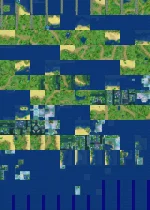
Thank you for the Informations, I am trying to get the bigmap done in the correct way now. But it seems like the order of the minimap tiles are not correctly readen and the result in big map seems chaotic. you have an idea how to make it correct?

eier_10x14.webp
 
Is your minimap displaying correctly (the .pk file)? Because it should be getting the information from there, and if it's working properly, it should display correctly. It would be easier if you showed me the screenshot or the process on Discord, but I want others who have a similar problem to be able to solve it.