
RUS symbols in the game?

[TwT]~Darkness

Pirate
Registered
LV
0
 
Joined
Mar 11, 2026
Messages
24
Reaction score
2
Points
8
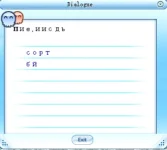
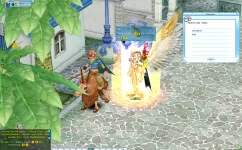
Good afternoon. I’ve run into an issue with fonts in the game. The plan was to keep English as the main language, but add Russian text using “\” and generally implement Cyrillic characters in the game. However, everything ends up looking broken—the client refuses to display the font correctly.

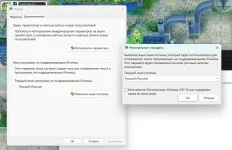
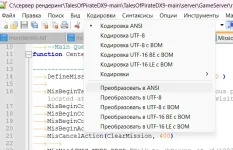
Has anyone encountered something like this before? Could someone suggest how to fix it? My Windows settings are configured correctly, and UTF-8 is disabled. I set the server/client file encoding to ANSI, convert to ANSI, and then save. The characters do appear, but as you can see from the screenshots, they’re distorted.

Maybe someone can explain what’s going wrong?
Perhaps I made a mistake somewhere or missed something.

Thanks in advance to anyone who responds.

1774050946777.webp1774051309799.webp1774051371683.webp
 
This is a very ancient and lost knowledge.

In the MPFont.cpp file, remove all constructs of the following form:
C++:
if ( *ch & 0x80 )
{
    ch++;
    offset = w * 2 + ASSIZE;
}
....
if ( ch[0] & 0x80 )
{
    n++;
    ch[1] = szText[n];
    offset = w + ASSIZE;
}
There are seven such places in the file. They are slightly different, but they all check for 0x80.
Previously, the logic was: “if the high bit is set (& 0x80), we assume that the character is two bytes.” This is suitable for Chinese/Korean ANSI pages (DBCS), but not for Russian CP1251, where a Russian letter is one byte 0xC0..0xFF.
If you don't remove this check:
- the parser "eats" an extra byte (ch++ / n++),
- the width is calculated as for a 2-byte glyph,
- the string "moves", and the characters break.

Further in the function CMPFont::TextToTexture
C++:
::TextOut(_hDc, 0, 0, sz, c1 & 0x80 ? 2 : 1);
replace with
::TextOut(_hDc, 0, -2, sz, c1 & 0x100 ? 2 : 1);
and the function CMPFont::FillTextToTex
C++:
::TextOut(_hDc, 0, 0, sz, ch[0] & 0x80 ? 2 : 1);
replace with
::TextOut(_hDc, 0, -2, sz, ch[0] & 0x100 ? 2 : 1);

0x80 for Russian bytes is almost always true, and TextOut gets a length of 2 (incorrect for CP1251).
0x100 in a typical build with unsigned char is almost always false, so the length becomes 1.
This is essentially a "hack" to disable two-byte mode without rewriting the code.

A shift of -2 raises the character image by 2 pixels to remove the visual “sagging”/clipping at the bottom and better fit the Cyrillic characters into the atlas cell.
 
  • Love
Reactions: [TwT]~Darkness
This is a very ancient and lost knowledge.

In the MPFont.cpp file, remove all constructs of the following form:
C++:
if ( *ch & 0x80 )
{
    ch++;
    offset = w * 2 + ASSIZE;
}
....
if ( ch[0] & 0x80 )
{
    n++;
    ch[1] = szText[n];
    offset = w + ASSIZE;
}
There are seven such places in the file. They are slightly different, but they all check for 0x80.
Previously, the logic was: “if the high bit is set (& 0x80), we assume that the character is two bytes.” This is suitable for Chinese/Korean ANSI pages (DBCS), but not for Russian CP1251, where a Russian letter is one byte 0xC0..0xFF.
If you don't remove this check:
- the parser "eats" an extra byte (ch++ / n++),
- the width is calculated as for a 2-byte glyph,
- the string "moves", and the characters break.

Further in the function CMPFont::TextToTexture
C++:
::TextOut(_hDc, 0, 0, sz, c1 & 0x80 ? 2 : 1);
replace with
::TextOut(_hDc, 0, -2, sz, c1 & 0x100 ? 2 : 1);
and the function CMPFont::FillTextToTex
C++:
::TextOut(_hDc, 0, 0, sz, ch[0] & 0x80 ? 2 : 1);
replace with
::TextOut(_hDc, 0, -2, sz, ch[0] & 0x100 ? 2 : 1);

0x80 for Russian bytes is almost always true, and TextOut gets a length of 2 (incorrect for CP1251).
0x100 in a typical build with unsigned char is almost always false, so the length becomes 1.
This is essentially a "hack" to disable two-byte mode without rewriting the code.

A shift of -2 raises the character image by 2 pixels to remove the visual “sagging”/clipping at the bottom and better fit the Cyrillic characters into the atlas cell.

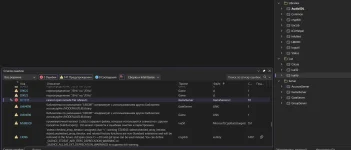
For me, as a beginner, this is a very complex and incredible process. I've already tried to finish everything 10 times, but every time there are such mistakes.
1774319428081.webp
 
1774323437939.webp
You are MY HERO! <3
BUT!
We also need to change here
C++
LogFont.lfCharSet = RUSSIAN_CHARSET;

in this case u can typing in the game by russian + NPC show ur text on rus. BUT.... Still need to some fix. right now ill try. Here ill show my trying step by steb for everybody and also for my memories
 

zLuke

May God grant this man long life and prosperity! Both in his own project and in life! If it weren't for him, I'd still be digging around in C++, in files like:
::TextOutA( _hDc, 0, -2, sz, 1 );
::GetTextExtentPoint32A(_hDc, &ch[0], 1, &size);
CMPFont::DrawText
And more else and else...
but thanks to the knowledge of this wonderful man, everything fell into place.
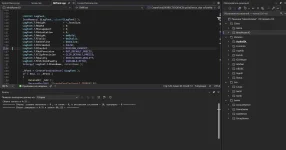
the last thing we do is go into:

scripts\lua\font.clu
1774336186499.webp
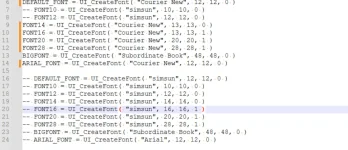
We simply change these values (for starters), and that's it. The Russian language appears in the game in its original, excellent form!


LOOK ^.^
1774336370258.webp